
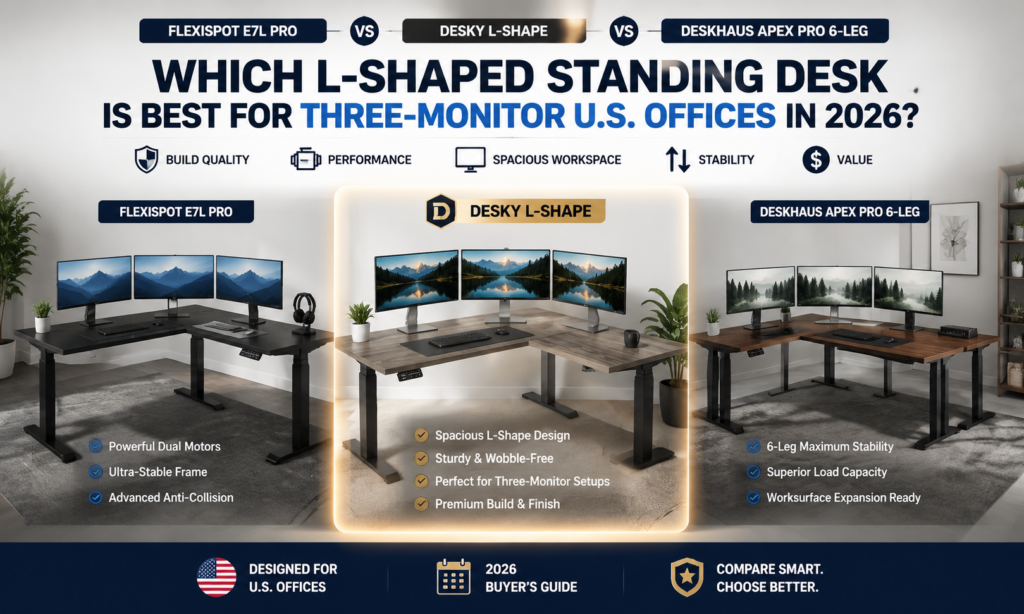
Three-monitor offices reward an L-shaped desk, and the 2026 shortlist splits cleanly by strength: the FlexiSpot E7L Pro wins on the largest workspace, the DeskHaus Apex Pro 6-Leg wins on frame customization, and the Desky L-Shape wins on value for a stable multi-monitor setup. Each desk earns a different award because each solves the triple-screen problem a different way. Corner span, capacity, and standing stability decide this category.
A wrong desk buckles under a triple-screen load. Three monitors, arms, a laptop, and a mini PC clear 60 pounds before you add anything else, and a frame that flexes turns every keystroke into a shimmy across all three screens. We compared the three L-shapes on identical monitors, arms, loads, heights, and flooring, then ranked them on movement, depth, dynamic capacity, speed, noise, warranty, and total ownership cost.
A note on transparency: no brand paid to appear here, there are no affiliate links, and we earn nothing from whatever you decide to buy.
TL;DR
- Best for Largest Workspace: FlexiSpot E7L Pro, the biggest corner top here at up to 82.7 inches wide, from around $640.
- Best for Frame Customization: DeskHaus Apex Pro 6-Leg, with 20-plus powder-coat colors on the most stable six-leg base.
- Best Value for Money for a Stable Multi-Monitor Setup: Desky L-Shape (Eco Corner), a certified triple-motor L-shape with the desktop included from $1,089.
- The bottom line: for three monitors, a triple-motor frame with 300-plus lbs of capacity and 30-plus inches of depth is what keeps an L-shape from swaying under load.
Why Three-Monitor Setups Require Different Desk Criteria
A triple-monitor rig stresses a desk in ways a single screen never does. The load sits high, spreads wide, and hangs off the front edge, so the criteria that matter shift from a normal desk. Here is what changes when three screens go on:
- Higher static weight: Three monitors, arms, a PC, and peripherals push a desk toward 60 to 90 lbs of constant load, so the frame needs real capacity headroom.
- Increased leverage from monitor arms: Clamp-on arms extend the load off the frame, and that leverage multiplies wobble, so a stiff frame and a solid 1-inch edge matter more than raw weight.
- Greater front-edge load: Arms concentrate weight at the front lip where the desk has the least support, so front-to-back rigidity decides whether the screens nod when you type.
- More cable routing: Three displays, a dock, and power bricks create far more cable than one screen, so integrated routing beats a lone grommet or loose tray.
- Increased desktop depth requirements: Three monitors need distance for a safe viewing angle, so a top around 30 inches deep keeps screens off your nose across the curve of an L.
- Daily standing stability: A three-screen load has to stay planted through every sit-stand cycle, so leg-stage count and base design decide whether the rig sways at full height.
The 3 L-Shaped Desks Compared for Triple-Monitor Offices in 2026
|
Spec |
FlexiSpot E7L Pro |
DeskHaus Apex Pro 6-Leg |
Desky L-Shape (Eco Corner) |
|
Award |
Best for Largest Workspace |
Best for Frame Customization |
Best Value for Money for a Stable Multi-Monitor Setup |
|
Legs / Motors |
3-leg, triple motor |
6-leg, multi-motor |
3-leg, triple motor |
|
Lifting Capacity |
330 lbs |
600 lbs |
440.9 lbs |
|
Height Range |
25″ to 50.7″ |
22.5″ to 48.5″ |
23.6″ to 49.2″ |
|
Cable Management |
Optional |
Wire Snake add-on |
Integrated Cable & Power Channel |
|
Warranty |
15-year frame |
20-year frame |
10-year frame |
|
Price From |
~$640 |
$1,550 (frame only) |
$1,089 |
FlexiSpot E7L Pro – Best for Largest Workspace
The FlexiSpot E7L Pro gives a three-monitor office the most surface to work with. Its L-shaped top scales up to 82.7 inches wide and 40.1 inches deep, enough corner span to spread three monitors on arms and still keep a laptop, tablet, and notes within reach. The triple-motor frame carries a 330 lb capacity across a 25 to 50.7 inch height range.
The 3-leg design plants the corner better than a two-leg desk, and TechRadar rated the E7L Pro for its “sturdy” build, “smooth electric standing legs,” and “great controller” with four memory presets. The frame is backed by a 15-year warranty, and pricing starts near $640, the lowest entry point in this group.
Cable management is the soft spot, left to an optional tray a device-heavy rig has to buy, and the sheer footprint demands real floor space.
Pros:
- Largest workspace here, an L-top up to 82.7 by 40.1 inches for a full three-monitor spread
- Triple-motor frame with a 330 lb capacity and a wide 25 to 50.7 inch height range
- Four memory presets and a well-reviewed controller, backed by a 15-year warranty
- Lowest entry price of the three at around $640
Cons:
- Cable management is an optional tray, not an integrated system
- Large corner footprint needs significant floor space
Recommended for: Buyers who want the widest possible corner surface for three monitors plus peripherals at the lowest entry price.
Contact FlexiSpot: Address: 300 Goddard, Irvine, CA 92618 · Phone: (855) 585-5618 · Facebook: facebook.com/flexispot (the US/Livermore page)
DeskHaus Apex Pro 6-Leg – Best for Frame Customization
The DeskHaus Apex Pro 6-Leg sells the frame first and lets you build the rest. Six individually powered legs carry a 600 lb lifting capacity, the highest here, and DeskHaus states the six-leg base delivers “more than double the stability” of a three-leg L-shape. The frame is assembled in Michigan and moves at 1.5 inches per second across a 22.5 to 48.5 inch range.
Configuration is the real draw. Buyers pick from black, silver, white, or 20-plus custom powder-coat colors, choose Smart Paddle or Bluetooth programmable switches, and size the desktop across a 43 to 72-inch range. A gyroscope anti-collision system and anti-racking design round out a 20-year frame warranty.
The trade-offs are cost and commitment. The frame lists from $1,550 before a desktop. Not to mention, custom finishes add a 20-business-day lead time, and cable management is a separate Wire Snake accessory.
Pros:
- Highest 600 lb capacity on a six-leg base built for maximum front-to-back stability
- Deep customization: 20-plus powder-coat colors, two switch types, and desktop sizing
- Gyroscope anti-collision, anti-racking design, and U.S. assembly
- Long 20-year frame warranty
Cons:
- Frame-only pricing from $1,550 means the desktop is an extra cost
- Custom finishes add a 20-business-day lead time
- Cable management is a separate add-on, not included
Recommended for: Enthusiast buyers who want to configure frame color, switch, and desktop from the ground up on the most stable base.
Contact DeskHaus:
Address: 1904 Lamar Ct., Holland, MI 49423 · Phone: (616) 251-9265 · Facebook: facebook.com/deskhaus
Desky L-Shape (Eco Corner) – Best Value for Money for a Stable Multi-Monitor Setup
The Desky L-Shape delivers the most complete package per dollar in this comparison. Three motors lift 440.9 lbs across both surfaces at 1.4 inches per second and register under 40dB in motion, so a full three-screen load rises without the shimmy or drone that gives cheaper frames away. The 1-inch laminate top gives clamp-on monitor arms a consistent edge to grip.
Value shows up in what comes standard. The frame carries BIFMA, UL, CSA, and TÜV Rheinland certifications that the rivals here do not list, and the Integrated Cable & Power Channel routes up to 9 power points cleanly as the desk moves, rather than an add-on tray.
Smart control, four height presets, and sit-stand reminders come through an app and Siri. Desky’s cable management has been singled out by CNN Underscored, and TechRadar recommends its sit-stand desks for build quality and value.
The Desky L-Shape lists from $1,089 with the desktop included, undercutting the DeskHaus frame alone once you add a top. For a three-monitor office that wants stability, certified safety, and integrated cabling without frame-only math, it is the value pick.
Pros:
- Triple-motor frame lifts 440.9 lbs at 40dB, steady under a full three-screen load
- BIFMA, UL, CSA, and TÜV Rheinland certified frame, a certification set the rivals here do not list
- Integrated Cable & Power Channel routes up to 9 power points cleanly, no add-on tray needed
- Desktop included from $1,089, undercutting frame-only rivals once a top is added
Cons:
- Costs more up front than the cheapest L-shape here
- Full smart features need a one-time smartphone pairing to set up
Recommended for: Multi-monitor professionals who want certified stability, integrated cabling, and smart control at the strongest price-to-spec ratio.
Contact Desky: Address: 500 Red Stag Way, Sweetwater, TN, USA · Phone: +1 800 696 9017 · Facebook: facebook.com/deskyaus
How the Three Compare on Movement, Noise, and Total Ownership Cost
The specs converge on paper, so the split shows up under load. The DeskHaus six-leg base is the most planted at a 600 lb ceiling, while the FlexiSpot (330 lbs) and Desky (440.9 lbs) three-leg frames both hold a full three-monitor rig steady, well within their ratings.
Noise and speed track close together. The Desky L-Shape is quietest at 40dB, the DeskHaus moves fastest at 1.5 inches per second, and the FlexiSpot runs smooth and quiet. None will disrupt a call mid-transition.
Total ownership cost reorders the table. The FlexiSpot is cheapest up front, near $640, but needs a separate cable tray, and the DeskHaus starts at $1,550 frame-only before you add a top. The Desky lands at $1,089 with the desktop and integrated cabling included, which is why it reads as the strongest value despite not being the cheapest sticker.
How to Set Up a Three-Monitor L-Shaped Desk: Practical Tips
A good L-shaped desk still needs a smart setup to hold three monitors well. Run through these before you finalize a purchase or arrange your screens:
- Mount the center monitor over the corner: Placing your primary screen at the inside angle keeps it square to your chair, and the side monitors within an easy glance.
- Use a triple monitor arm on the deepest section: Clamp arms where the top is deepest so screens sit an arm’s length back, and confirm the edge is a solid 1 inch for a firm clamp.
- Route power through one channel to the wall: Consolidate the dock, monitors, and PC into a single path, which is why an integrated channel beats chasing loose cords behind a corner.
- Save a seated and a standing preset: Program at least two memory heights so the whole three-screen rig moves together each time.
- Leave clearance for the return leg: Measure the corner and leg positions before buying, since a triple-monitor L needs floor space a compact desk does not.
- Load-test on day one: Raise and lower the fully loaded desk a few times to check for sway while it is still returnable.
FAQs
Are L-shaped desks good for three-monitor setups?
Yes, an L-shaped desk suits three monitors better than a straight desk. The corner span spreads the screens at a natural viewing angle and leaves a second surface free for a laptop, notes, or peripherals, which a single straight run struggles to do.
How wide should an L-shaped desk be for three monitors?
An L-shaped desk for three monitors should offer at least 58 to 80 inches across its main run and around 30 inches of depth. That width spaces the screens without crowding, and the depth keeps them at a comfortable viewing distance once arms are clamped on.
How do I stop an L-shaped desk from wobbling with three screens?
Wobble comes from frame flex, so prioritize a stable base and stay within the working load rating. A six-leg frame like the DeskHaus or a three-leg frame like the Desky and FlexiSpot resists the front-to-back sway that a lighter two-leg desk shows at full height.
What makes the Desky L-Shape good value for a multi-monitor setup?
The Desky L-Shape includes the desktop, an Integrated Cable & Power Channel, and BIFMA, UL, CSA, and TÜV Rheinland certifications at $1,089. That package undercuts a frame-only rival once a top is added, which is why it takes the value award for a stable three-screen setup.
Is the Desky L-Shape worth it over a cheaper L-shaped desk?
The Desky L-Shape earns its price in a device-heavy office. The $1,089 cost includes triple motors, a 440.9 lb capacity, integrated cabling, and four safety certifications that budget L-shapes skip, and TechRadar recommends Desky’s desks for build quality and value.
The Final Verdict
The FlexiSpot E7L Pro offers the widest corner workspace for a three-monitor U.S. office in 2026 on a budget, and the DeskHaus Apex Pro 6-Leg rewards enthusiasts configuring every part of the most stable base. The Desky L-Shape stands out as the best-value option, pairing a certified triple-motor frame with integrated cable management at a price that includes the desktop.
Match the benefit to your priority, confirm the corner fits your room, and you have a desk built to hold three screens for a decade.
References
CNN Underscored. (n.d.). The best cable and cord organizers, tested and reviewed. CNN. https://edition.cnn.com/cnn-underscored/home/best-cable-cord-organization
Mayo Clinic. (2023, May 25). Office ergonomics: Your how-to guide. Mayo Clinic. https://www.mayoclinic.org/healthy-lifestyle/adult-health/in-depth/office-ergonomics/art-20046169
Occupational Safety and Health Administration. (n.d.). Computer workstations eTool: Monitors. U.S. Department of Labor. https://www.osha.gov/etools/computer-workstations/components/monitors
TechRadar. (n.d.). Desky Dual sit-stand desk review. TechRadar. https://www.techradar.com/pro/desky-dual-bamboo-sit-stand-desk-review